
SketchUp Online Course – Choose Your Live Training Format
NICE TOWER ACADEMY · ARCHITECTURAL MODELING

Read the project guide
NICE TOWER ACADEMY · ARCHITECTURAL MODELING
A SketchUp online course should help you connect individual tools to a practical design workflow. Nice Tower offers live training for beginners, architecture students, interior designers and professionals who want clearer modeling habits and direct guidance. Start with accurate geometry, organize the model and develop projects that explain your design ideas through useful views and material choices.
The current training options share 16 live sessions, two sessions per week, practical projects and instructor guidance. Choose a five-student Team Class, a two-student Premium Duo or one-to-one VIP Private training. Class size, price and after-course support differ, so compare the details before reserving a place.
Table of Contents
SketchUp online course: three class formats
Standard Team Class
$150 per person · 5 students
Core SketchUp workflows and practical exercises
View Standard Team Class detailsPremium Duo
$250 per person · 2 students
2 months of after-course support
View Premium Duo detailsVIP Private
$400 total · 1 student
4 months of full support after the course
View VIP Private detailsEach Team Class student registers separately. The team starts when all five seats are confirmed; Premium Duo begins when both students are confirmed. VIP Private requires no partner and includes a personalized learning plan. The current comparison lists two months of after-course support for Premium Duo and four months of full support for VIP Private.
Use the full course comparison as the reference for current prices and included features. The five-student team costs $750 in total, the two-student duo costs $500 in total and private training costs $400 for one student. Ask about available dates before enrollment so the format and timetable fit your learning plans.
What to practice in a SketchUp online course
Learn the interface, navigation, drawing tools and measurement controls before adding complex detail. Check units and establish the basic architectural shell, then organize geometry with groups and components. This makes it easier to revise a wall, change a repeated object or inspect a specific part of the design without damaging unrelated geometry.
The original training introduction includes interior, facade and furniture projects, along with free plugin workflows. Use these project types to connect modeling tools to different tasks: planning an interior layout, developing architectural proportions or constructing a furniture component. Confirm the precise project selection with the instructor, particularly if your private learning plan has different goals.
For a SketchUp online course exercise, start with a manageable room or object. Mark the main dimensions, build a clean first version and inspect it from several angles. Add materials after checking the geometry rather than using textures to hide mistakes. Create saved scenes so design alternatives can be compared with the same camera positions.
Prepare for your SketchUp online course
SketchUp online course software and workspace
Have SketchUp available on the computer you plan to use and ask which version is appropriate before purchasing software. Check your connection and microphone for live sessions. Prepare a folder for lesson files, practice versions and screenshots, and give each file a useful name so you can find the exercise that needs feedback.
Between sessions, repeat the modeling sequence and note any steps that remain unclear. Save a version before major changes, separate imported objects from architectural geometry and keep repeated elements as components. A short question linked to a specific model view is easier to discuss than a broad request to fix the entire project.
Your SketchUp online course practice should also include a review of the model structure. Hide furnishings to inspect the room shell, check reversed faces, look for overlapping geometry and compare texture scale. Record one improvement after each lesson so you can see how your working method develops across the live sessions.
Watch the SketchUp online course introduction
Explore how Nice Tower connects SketchUp tutorials to portfolio-ready projects. This introduction helps you understand the practical learning approach before choosing a live class format.
Preview practical modeling topics
These public Nice Tower tutorials show examples of architectural modeling practice. Explore them before choosing the SketchUp online course; the exact live lesson projects are confirmed with the instructor.
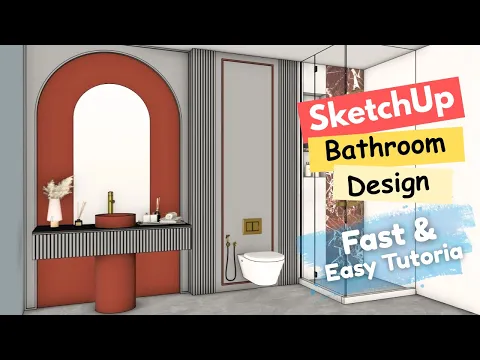
Modern bathroom modeling
Explore interior geometry, vanity details and a coordinated material palette.
Explore interior tutorials
Modern bedroom modeling
Practice room proportions, a feature wall and organized interior geometry.
Explore the bedroom projectContinue learning alongside your SketchUp online course
Explore the SketchUp tutorial library for practical design topics and watch lessons on the Nice Tower YouTube channel. Public videos can help you identify questions for live training, while the SketchUp tools guide introduces related resources. Check the availability and usage terms of any project file separately.
Premium and VIP include advanced plugins and AI rendering workflows in the current plan comparison. Build a clean, organized model first, then use visualization to test materials, lighting and design alternatives. Keep the editable working model separate from presentation experiments so you can return to the geometry when feedback requires a change.
SketchUp online course: questions before booking
Which format is best for a beginner?
All formats share a structured foundation. Compare your budget, preferred class size and need for individual feedback rather than assuming private instruction is required for every beginner.
How long is the live program?
The published plans include 16 live sessions with two sessions per week. Confirm the actual timetable and any breaks with Nice Tower before reserving your place.
Is software or every video project file included?
Do not assume that a course registration includes software licenses or every model shown in public tutorials. Review the enrollment information and ask the instructor if a particular resource is important to you.